
Authorized Fonts
Primary Fonts
The font palette has been selected to establish and maintain consistency among the various and diverse marketing materials, program elements and design systems. To provide flexibility and complement the Stony Brook Medicine logo, a complete font family has been selected for use.
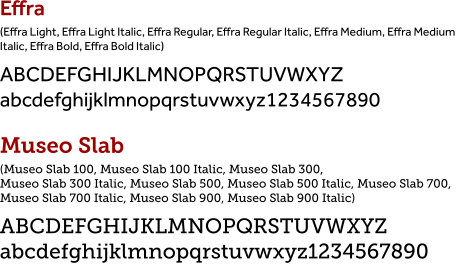
- Primary fonts, Effra and Museo Slab, are the core typefaces used to establish a visual hierarchy and consistent brand identity.
- Effra is the preferred primary font for headlines, sub-headlines, body copy, captions and callouts or other various applications to create a visual contrast where appropriate.
- Museo Slab complements Effra providing visual contrast and style for body text, subheadings, captions and other supporting information on a limited basis.
Primary Fonts - preferred
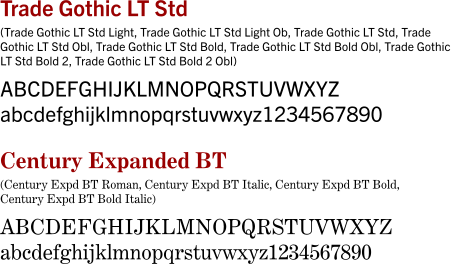
Secondary Fonts
Secondary fonts are only to be used as body copy or small headers. Use on a limited basis.
Examples
Examples show creative brand font styling for Stony Brook Medicine’s digital, video, print and apparel marketing.

Alternative Fonts
Alternative Fonts are to be used with Microsoft 365 PowerPoint and Word.
Microsoft 365 Fonts
Aptos Display, Aptos Body and Aptos Slab SemiBold, are the only fonts to use within the SBM PowerPoint templates.
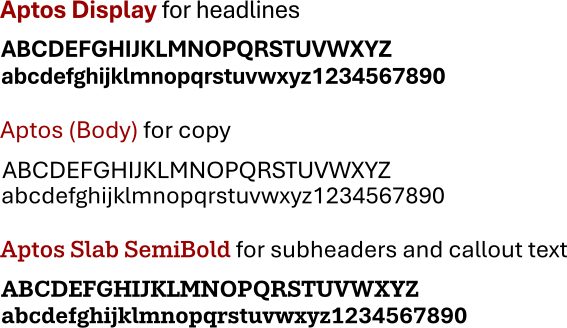
Note: Authorized Primary and Secondary Fonts called Effra, Museo Slab, Trade Gothic LT and Century Expanded BT, are NOT to be used with Microsoft products.
IMPORTANT:
- Use the Microsoft 365 PowerPoint desktop application to open this file to avoid formatting issues.
- For full functionality and correct formatting, download this file and launch it from your desktop or laptop in MS PowerPoint.
- Do not open in Google Slides (functionality errors will occur). Use MS PowerPoint only.
Google Fonts
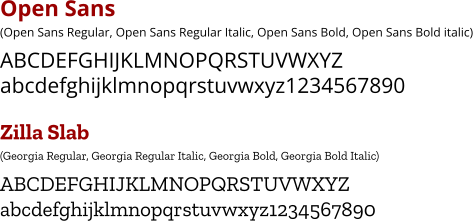
The Google fonts Open Sans and Zilla Slab, may be used as alternatives to our primary fonts for Google platforms. If you need to download and install these free fonts for cloud-based Google, visit the Google Fonts website.
NOTE: When a PowerPoint file is opened in Google Slides (Google's presentation program), advanced features may not work correctly such as:
- Google Slides might substitute a non-standard PowerPoint font with a different one, which can alter your layout and design.
- Advanced animations, motion paths, and some transitions (like PowerPoint's "Morph") are not supported in Google Slides and will be removed or altered.
- Charts are linked to their source data (Excel or Google Sheets), which is not cross-compatible. They often become non-editable images or mysterious objects during conversion.
- Embedded audio and video files often do not transfer correctly due to codec issues or platform differences.
- While basic shapes transfer, complex features like SmartArt or specific shape effects (e.g., some shadows, pattern fills) may break or become uneditable groups of objects. Use only basic animations and transitions (e.g., Fade, Dissolve) available in both platforms.
- Use the "Office Compatibility Mode" (OCM): Google Workspace has an OCM feature that allows you to work with .pptx files directly in Google Slides without converting them to the Google Slides format. This can help preserve formatting better, though some features may be disabled during editing.
Note: Authorized Primary and Secondary Fonts called Effra, Museo Slab, Trade Gothic LT and Century Expanded BT, are NOT to be used with Google products.